Enrich Cowrie with Geolocation data
Cowrie provide us with a lot of great data, but one thing which I miss it information about the IP (location, organization etc.). While you cannot draw conclusion based on the location of an IP, it is a fun data point to use since it allows us to visualize and perform some basic analysis. Let’s try to enrich our existing dataset with location data! 
- 1. From where do we grab the location data?
- 2. IPInfo
- 3. Enrich data and upload to SQL
- 4. Conclusion
1. From where do we grab the location data?
There are many source we potentially could use, but some which I have used before:
-
Maxmind
- Rate limit: infinite as you can download a local database, this requires you to keep it up to data since subnets can change owners.
-
IPinfo
- Rate limit: “Free usage of our API is limited to 50,000 API requests per month”
-
AbuseIPinfo
- Rate limit: 1 000 when using a free account
For now I will use IPinfo due since it is really easy to use. I might also use AbuseIPDB since that will give us some Threat Intel, i.e. “have this IP been seen attacking other people?”
2. IPInfo
After sign-in up for a free account we will grab our API key and test it our with curl:
echo "export IPINFOTOKEN=TOKEN" >> ~/.bashrc
source ~/.bashrc
curl https://ipinfo.io/24.199.113.111/json?token=$IPINFOTOKEN
{
  "ip": "24.199.113.111",
  "city": "Santa Clara",
  "region": "California",
  "country": "US",
  "loc": "37.3924,-121.9623",
  "org": "AS14061 DigitalOcean, LLC",
  "postal": "95054",
  "timezone": "America/Los_Angeles"
}
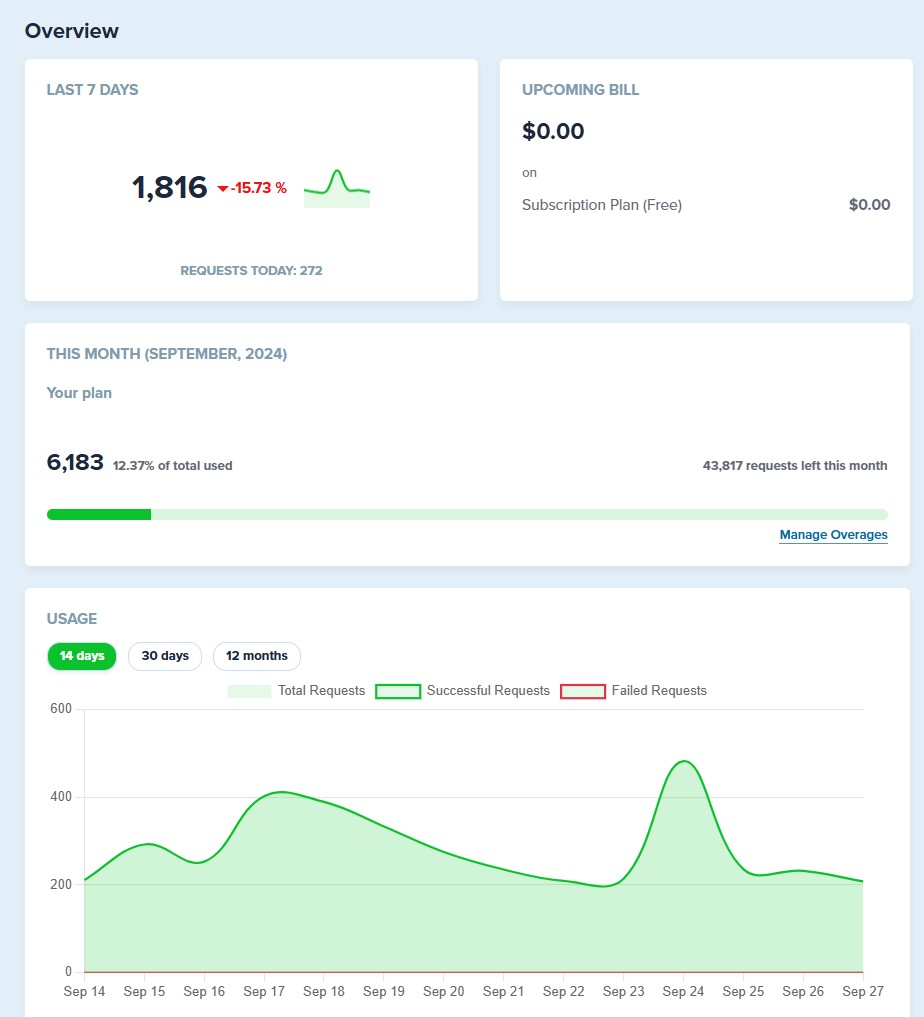
IPinfo Dashboard give us a historical view over out API usage:
3. Enrich data and upload to SQL
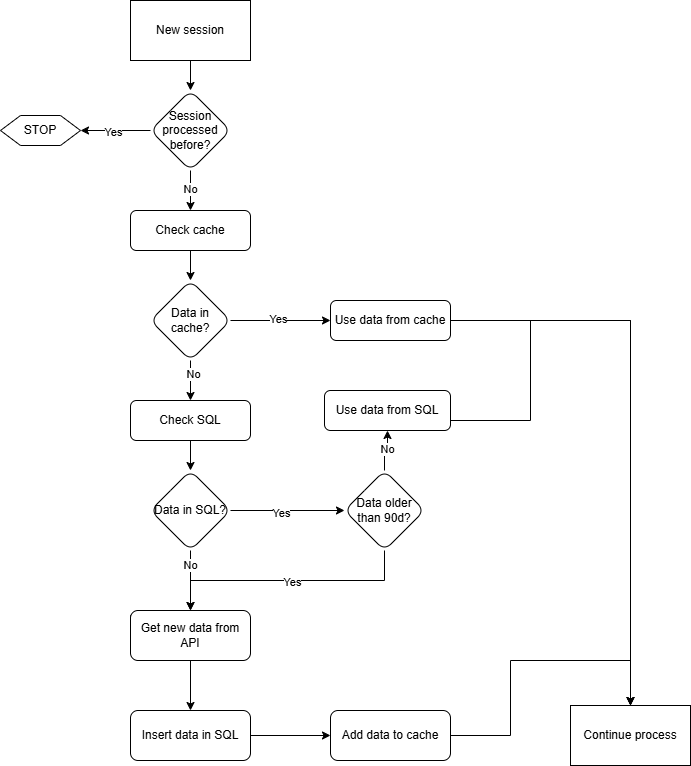
Since we want to be able to visualize with Metabase we need to store the data in SQL.
We want to:
- Check if we already have location data.
- Use the existing data if data is returned.
- Data should not be older than 90 days.
- Get the IP location data from IPinfo via the API.
- Store the data in SQL.
3.1. Prepare SQL
Create new table geoloc in cowrie DB:
CREATE TABLE geoloc (
      ip VARCHAR(15) NOT NULL PRIMARY KEY,
      hostname VARCHAR(255),
      org VARCHAR(255),
      city VARCHAR(255),
      region VARCHAR(255),
      country VARCHAR(3),
      timezone VARCHAR(50),
      anycast BOOLEAN,
      date_added DATETIME DEFAULT CURRENT_TIMESTAMP
);
3.2. Check if we already have data
To prevent a lot of unessecary API calls and SQL lookups, we’ll use a “session cache” (list in python) and we will only refresh the Geo data once it is older than 90 days.
3.3. Collect the data via IPinfo API
We will basically do this for each new IP we find.
import requests
api_url = f"https://ipinfo.io/{ip_address}/json?token={IPINFOTOKEN}"
response = requests.get(api_url)
In insert_geodata_to_db we insert data to sql:
query = "INSERT INTO geoloc (ip, hostname, org, city, region, country, timezone, anycast) VALUES (%s, %s, %s, %s, %s, %s, %s, %s)"
cursor.execute(query, (geo.ip, geo.hostname, geo.org, geo.city, geo.region, geo.country, geo.timezone, geo.anycast))
3.4. SQL data
Let’s take a look at the new rows in the table:
select * from geoloc limit 2;
+----------------+----------+------------------------------------------------------+----------+-------------+---------+---------------+---------+---------------------+
| ip             | hostname | org                                                  | city     | region      | country | timezone      | anycast | date_added          |
+----------------+----------+------------------------------------------------------+----------+-------------+---------+---------------+---------+---------------------+
| 1.234.58.162   | N/A      | AS9318 SK Broadband Co Ltd                           | Ansan-si | Gyeonggi-do | KR      | Asia/Seoul    |       0 | 2024-09-29 04:15:04 |
| 101.126.54.95  | N/A      | AS137718 Beijing Volcano Engine Technology Co., Ltd. | Beijing  | Beijing     | CN      | Asia/Shanghai |       0 | 2024-09-29 07:15:04 |
+----------------+----------+------------------------------------------------------+----------+-------------+---------+---------------+---------+---------------------+
4. Conclusion
After querying IPinfo to collect and enrich our attackers IP addresses, we can now use the location data to perform additional data analysis. 